If you don’t rank AI work the same way every time, you end up funding noise instead of results.
I’d boil this guide down to five steps: use one intake form, score each idea on value and delivery fit, stop weak ideas at governance review, group approved work into delivery waves, and review the roadmap on a set cadence. That’s how I’d turn a pile of AI requests into a roadmap tied to budget, owners, and business KPIs.
Here’s the short version:
- Start with one intake path so every request includes the same facts
- Score each use case on business impact, time to value, data readiness, feasibility, alignment, and risk
- Gate work before build with compliance, data, and model checks
- Plan by wave, not by noise so dependencies come first
- Review often to match spend, staffing, and delivery status
A few numbers stand out:
- 4.0+ score = start now
- 3.0–3.9 = next in line
- 2–6 weeks = good proof window for uncertain ideas
- 60–90 days = common first-wave timeline
- One AEC example in the article cites 60% lower cost and 3x adoption after moving from underused Copilot seats to a custom Azure AI setup
What I like here is the main point: a high-scoring AI idea still should not move forward until data, budget, access, and compliance are cleared. That one rule can save months of delay.
If I were setting this up, I’d treat the process as a simple filter: Is the use case worth it? Can we deliver it? Are we allowed to run it? And where does it fit on the roadmap?
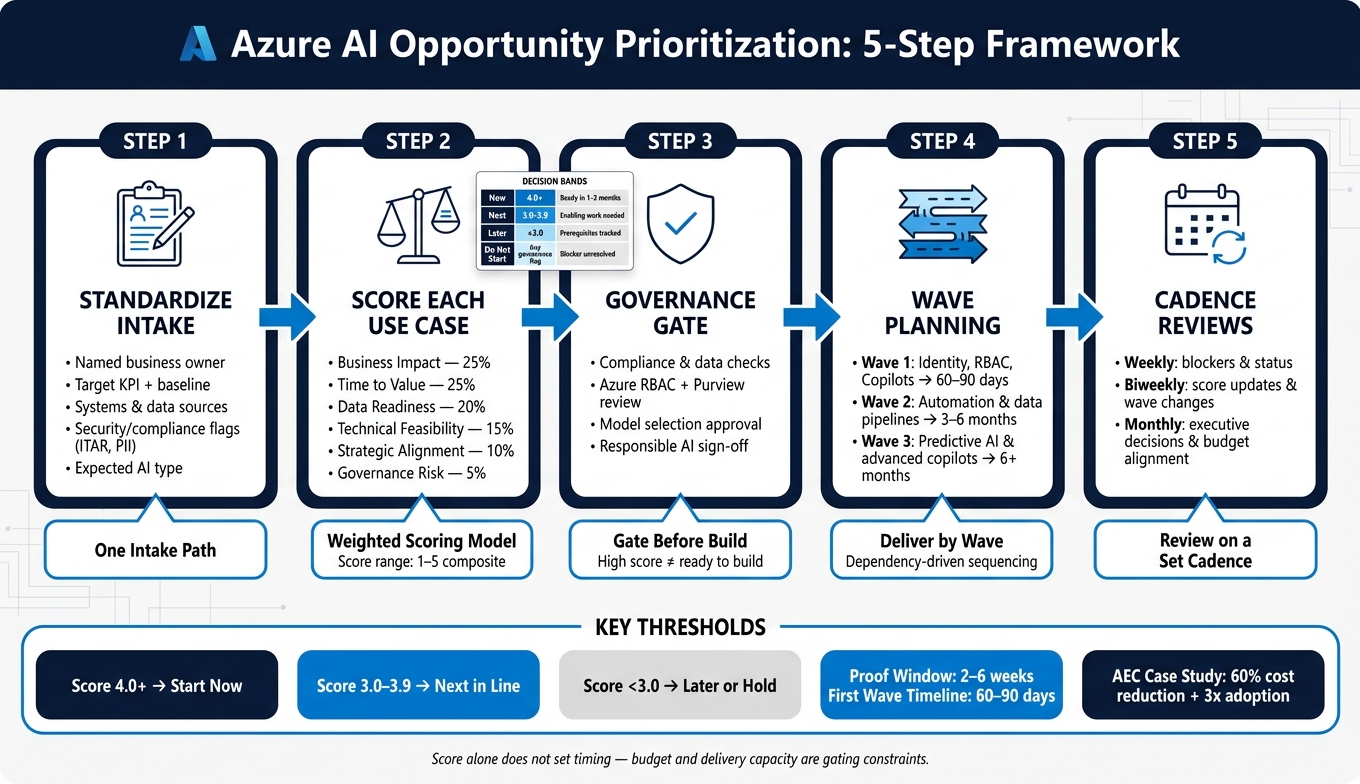
Azure AI Opportunity Prioritization: 5-Step Framework
1. Build a Standard Intake Process for Azure AI Requests
When teams don’t use one intake path, Azure AI requests show up in all kinds of shapes. Some come in as emails. Some live in slide decks. Some get mentioned in meetings and never written down. That creates a mess fast: no owner, no shared format, and no clean way to compare one request against another.
A standard intake process fixes that. It pushes every request through the same set of questions before scoring starts and before anyone gets into technical design.
Required fields for each AI opportunity
Each intake entry should answer the same core questions.
Start with the business objective. It needs to be specific. Not “improve quality,” but something like “reduce unplanned downtime on CNC machines by 10%.” That kind of goal gives teams something they can measure and act on.
From there, the form should include:
- A named business owner
- A target KPI with a current baseline
- The user group such as field engineers, maintenance technicians, or quality inspectors
- A plain description of how the AI changes the current workflow
You also need to document the systems involved and where the data sits. For production teams, that usually means ERP, MES, PLM, BIM/CDE, CRM, and Microsoft 365, along with the data platforms tied to them.
The expected AI type matters too. Is this document extraction, predictive analytics, a conversational copilot, or workflow automation? That gives downstream teams a better starting point when mapping the request to Azure services.
Security and compliance should be logged up front, not halfway through the project. That includes ITAR/EAR scope, data residency rules, whether PII is present, and how sensitive the IP is.
| Intake Field | What to Capture | Example Context |
|---|---|---|
| Business objective | Specific, measurable outcome | ”Cut RFI processing time by 30%“ |
| Target KPI + baseline | Primary and secondary metrics | OEE, defect rate, RFI cycle time |
| Systems + data sources | Core systems and where data lives | ERP, MES, PLM, Azure Data Lake |
| Expected AI type | Classification, prediction, extraction, copilot | Document Intelligence, AML |
| Security/compliance | Export control, residency, PII, IP sensitivity | ITAR, EAR, data residency rules |
| Desired timeline | Target pilot and go-live window | Pilot in 90 days, rollout in 9–12 months |
How to capture readiness at intake
Intake should also include a short readiness checklist. Keep it focused on four areas: data, system access, executive sponsorship, and production constraints.
For data, ask a simple question: do the records exist in a usable digital format? If the answer is “sort of,” that’s a warning sign. Scattered files, paper-only records, or inconsistent schemas usually mean the request belongs in discovery, not in a delivery wave.
For system access, confirm that IT or OT teams have an approved integration path for each listed system. If access is still up in the air, flag the request for discovery.
Sponsorship needs to be more than a name on a form. There should be a leader who will back process changes, training, and adoption. Without that, even a sound use case can stall.
For aerospace and defense work, compliance review may need to happen before anything else. If ITAR/EAR status is unresolved, or if the rules for sending data to cloud services are unclear, route the request there first.
The big point is simple: readiness starts with accessible data and clear system ownership before build work begins.
Requests that fail readiness checks should move to discovery, not the delivery queue.
How intake fits continuous delivery programs
A shared delivery board makes the whole process easier to manage. If you build it in Azure DevOps and have intake entries automatically create work items tagged by industry, system type, data source, and AI type, requests stay visible and easy to compare.
Each entry should include both a named business owner and a named technical contact. A department name alone isn’t enough.
A recurring triage rhythm led by a Program Manager and Solution Architect keeps the board active. Requests with fuzzy ownership or unclear data move to discovery. Requests with accessible data and committed sponsors move into an active delivery lane.
Once every request comes through the same intake structure, you can score value, feasibility, and risk on equal footing.
2. Score Opportunities by Business Value, Feasibility, and Risk
Once intake is standardized, score each request against the same criteria so teams can compare priorities side by side. That matters because most portfolios include very different use cases, and without a shared model, decisions turn into opinion contests. The aim here is a consistent way to defend why one item gets funding now, another waits, and another stays on hold.
Use a weighted scoring model with clear priority bands
A simple way to do this is with six dimensions, each scored on a 1–5 scale and given a weight. Business impact and time to value usually matter most, so they often carry about 25%–30% each. Data readiness and technical feasibility often fall in the 15%–20% range. Strategic alignment is often around 10%, while governance risk is usually either a smaller weighted factor or a gating check.[7][8][10][11]
| Dimension | Weight | Score 1 | Score 5 |
|---|---|---|---|
| Business impact | 25% | Minor efficiency gain in a single team | Measurable revenue growth, cost reduction above $250,000/year, or risk reduction tied to key operational metrics |
| Time to value | 25% | More than 12 months to measurable value | Less than 3 months from start to first production impact |
| Data readiness | 20% | Data mostly on paper or scattered across legacy systems | Data already in Azure storage or databases with clear schemas, lineage, and basic cleansing in place |
| Technical feasibility | 15% | No established Azure implementation pattern | Reusing established patterns and existing services |
| Strategic alignment | 10% | Tangential to current OKRs | Explicitly named in the annual plan |
| Governance risk | 5% | High regulatory exposure or unresolved controls | Internal-only use with established controls |
Multiply each score by its weight, then add the results to get a composite score from 1 to 5. From there, sort requests into four decision bands:
- Now: 4.0+ and ready to start in the next 1–3 months
- Next: 3.0–3.9 with enabling work or dependency resolution
- Later: Below 3.0 with prerequisites tracked on the roadmap
- Do Not Start Yet: Any unresolved governance flag or missing business sponsor
That last band is a hold, plain and simple, until the blocker is cleared. It also helps to test the rubric against 5 to 10 known use cases and document the scoring logic in a one-page guide so people aren’t guessing what a 3 versus a 4 means.
One more thing: score does not set timing by itself. Budget and delivery capacity still put a cap on what can move.
Adjust scores using budget fit and delivery capacity
Budget fit and team availability sit on top of the scoring model as gating constraints. Estimate the full cost picture, including compute, storage, networking, model usage, monitoring, integration work, and Azure OpenAI token costs, in both monthly and quarterly dollar terms. Then map each use case to a budget tier and compare it with the approved spending envelope.
If a use case is over the current approved budget envelope, move it from Now to Next even if its composite score looks strong, unless offsetting funds are found. The same logic applies to staffing. If the needed specialists are below 50% availability over the next two quarters, drop the item by one band or cut its score by 10%–30%.
This keeps the process honest. A use case may look great on paper, but if the money isn’t there or the people aren’t free, it’s not ready.
Use short proofs to reduce uncertainty before full commitment
When a use case sits on the bubble, a short proof can cut down uncertainty before a full commitment. Use a time-boxed proof when data quality, latency, or adoption is still unclear. Keep it tight: 2–6 weeks with a defined budget.[4][5][7][9][10]
For a data or model proof, you might ingest a sample dataset into Azure Data Lake Storage, run a baseline feature pipeline, and test a prompt pattern in Azure OpenAI. What you learn should feed right back into the scoring model. Better-than-expected data quality can lift the data readiness score. Latency issues can lower technical feasibility. Strong early user pull can improve both business impact and time to value.
Governance still applies during a proof. If you spin up an Azure environment, even for a short test, you still need a lightweight governance checklist in place first: access controls through Azure Active Directory, role-based permissions, and data protection rules before any record is processed. A proof that surfaces a compliance blocker, such as unresolved handling of controlled unclassified information, should move the use case to Do Not Start Yet until that issue is fixed, no matter how well the model performs from a technical angle.[4][5][7][9][10]
After scoring, move governance and model review into the approval step.
3. Apply Governance, Data Limits, and Model Review Before Approval
A high score does not mean a use case is ready to build.
It only means the use case has earned a review. Governance, data, and model checks decide whether work can start. This is the gate between prioritization and delivery.
Governance checks for regulated and operationally critical use cases
Every use case moving toward delivery needs a clear approval path. A business owner, a data protection or privacy officer, a security or compliance lead, and an AI/ML lead should sign off on a one-page AI use case dossier. That dossier should cover the purpose, data sources, models used, controls already in place, and residual risk. Store it in a central registry.
Ownership should stay split:
- Platform owns infrastructure and policy
- ML owns model artifacts
- The business owns production approval
Even items in the Now band still need to pass this gate before build work begins.
At this stage, the focus should be on putting controls in place, not just listing risks. Define Azure RBAC with least-privilege roles before the first line of code is written. Use Microsoft Purview to classify data, apply sensitivity labels, and track lineage so only approved datasets reach training pipelines or prompt inputs. Keep a short audit log, with every model call tied to a traceable ID for the user, use case version, and timestamp.
For agentic workloads, Microsoft’s guidance calls for circuit breaker functionality, auditability of agent activities, and role-based access control. [3] Content filtering, abuse monitoring, and safety system prompts should be configured in Azure OpenAI before any user-facing deployment. For high-risk use cases, require sign-off from a Responsible AI or ethics review board.
Once governance is set, the next step is to check the data and service limits that can slow delivery.
Data readiness and Azure service limits that change priority
Poor data quality is one of the most common reasons a high-scoring use case gets pushed back after funding is approved. It happens all the time: the idea looks strong on paper, but the data is messy, incomplete, or stuck in the wrong place.
Before that happens, confirm that:
- A named data steward exists
- Null rates and format inconsistencies are under control
- Data can move to the required Azure region
- Lineage from source to model input is traceable
Data quality is only part of the story. Azure service limits can change priority by themselves.
Azure OpenAI quota is scoped per subscription, per region, and per model deployment. It does not pool across regions. [14][16][17] Document Intelligence supports up to 15 analyze transactions per second by default, with a maximum document size of 500 MB and an analysis ceiling of 2,000 pages. [15] Azure AI Search caps individual document payloads at about 16 MB. [13]
So if a use case needs quota increases, scarce GPU capacity, or a complex VNET design to meet its SLA, it should drop one band or begin as a pilot. That may feel conservative, but it saves teams from greenlighting work they can’t deliver on time.
Model selection and review for production use
Model choice is not just an architecture call. It’s an approval call.
It needs to match approved Azure services before design is locked. Azure Policy can restrict which AI models an organization may use, so model choice has to line up with approved services before architecture decisions are finalized. [12]
Use classical ML through Azure Machine Learning for structured prediction tasks like demand forecasting, anomaly detection, and failure classification, where interpretability and cost matter. Use Document Intelligence to extract fixed fields from invoices, purchase orders, RFQs, or inspection forms. Use Azure OpenAI patterns when the task needs reasoning, free-form generation, or retrieval-augmented generation (RAG) over enterprise knowledge.
In practice, hybrid designs are common. A document-heavy workflow might use Document Intelligence for extraction and Azure OpenAI for summarization. That’s often the right mix because each service handles the part it’s built for.
The model decision determines whether the use case can move ahead, not just which service gets picked. Before approving a build, require proof across four areas: performance, reliability, bias, and traceability.
Use task-fit metrics with clear minimum thresholds, such as ≥0.85 F1 for a classification model. [18][19] Check that drift detection is configured, A/B or shadow deployment is planned, subgroup performance has been reviewed, and generative models have gone through qualitative prompt testing. Verify that the model is versioned in the Azure ML model registry and tied to specific datasets, code commits, and training runs. It should also include a model card that documents limitations and appropriate use.
For teams running multiple AI workloads across regulated environments, Ryshe’s Quanta enterprise AI context gateway centralizes policy enforcement, observability, context optimization, and append-only audit records across workloads. That helps teams keep governance standards consistent without rebuilding controls for each use case.
Only after these checks does the work move into scheduled delivery waves. Approved use cases then move into delivery waves and roadmap tracking.
4. Turn Priorities Into Delivery Waves and a Living Azure Roadmap
Once a use case clears governance, slot it into delivery waves based on dependencies. That same wave logic turns a ranked backlog into a roadmap a team can actually ship.
Group use cases into delivery waves with dependency logic
Wave 1 is the base layer: Entra ID setup, RBAC, Azure Monitor, Log Analytics, and core data-platform work, plus low-risk productivity copilots. This wave usually ships in 60–90 days. [6]
Wave 2 adds workflow automation and data integration. That includes Azure Data Factory pipelines, document extraction with Document Intelligence, and connections to line-of-business systems. The usual timeline is 3–6 months. [6]
Wave 3 is where predictive systems and advanced copilots come in, and that often takes 6+ months. [6]
The order matters because the dependencies are real, not optional. Identity and access need to be set up before any user-facing copilot goes live. Data pipelines need to be stable before teams train prediction models. Document extraction has to hit the right accuracy level before downstream approval flows depend on it. And governance controls need to be in place before any workload expands to more business units or regions.
In AEC, manufacturing, and aerospace settings, this can look pretty straightforward:
- Wave 1: Digitize documents with Document Intelligence and build a central data lake
- Wave 2: Route extracted data into approval workflows
- Wave 3: Deploy a domain copilot with Azure OpenAI
- Wave 4: Add predictive models in Azure Machine Learning
This structure keeps delivery tied to dependency order, not whoever shouted the loudest.
Track roadmap progress with delivery and business metrics
Each opportunity should include an owner, score, wave, dependencies, delivery status (intake, analysis, design, build, test, pilot, production, scale), target environment, expected monthly Azure spend in USD, and a primary business KPI.
Tracking two metric groups helps keep the roadmap honest. Delivery metrics show whether execution is stable: cycle time from intake to production, throughput per wave, incident count, and uptime. Business metrics show whether the AI is hitting the target result: cycle-time reduction for document approvals, exception rate in automated workflows, throughput of processed items per day, and model quality scores. Financial tracking through Azure Cost Management, tagged by resource group and roadmap item, closes the loop between actual and budgeted monthly spend. [20] Use those signals to pause, move forward, or re-sequence waves.
| Metric Category | Examples |
|---|---|
| Delivery | Cycle time, throughput, incident count, uptime |
| Business | Exception rate, approval cycle-time reduction, task success rate |
| Technical AI | Model accuracy, latency, drift detection triggers |
| Financial | Actual vs. budgeted monthly Azure spend by wave |
Keep roadmap reviews tied to operating cadence
Monthly reviews handle executive wave decisions and budget alignment. Biweekly reviews line up with sprint cycles and cover score updates, new intake approvals, and wave changes driven by dependencies. Weekly reviews focus on blockers, status checks, and parking ideas that keep failing feasibility or governance checks. [21][22][23]
Each review needs named roles: product owner, lead architect, data lead, finance representative, and governance lead. Those roles should be tied directly to re-scoring and dependency changes, so updates reflect cross-functional input instead of one team’s opinion.
Ryshe’s continuous delivery structure fits these cadences directly. Its Starter, Growth, and Scale plans include named Solution Architects and Program Managers, with monthly, biweekly, or weekly delivery and outcome reviews, plus quarterly roadmap and architecture checkpoints. [1] That setup helps make sure roadmap changes turn into shipped work.
That same cadence also shows when lightweight triage is enough and when stricter scoring is worth the extra effort.
5. Compare Common Prioritization Approaches for Azure AI Portfolios
After you set up intake, scoring, and wave planning, the next step is simple: pick the lightest process that still keeps risk in check.
Not every Azure AI portfolio needs a heavy review model. A small internal automation backlog is one thing. A cross-business portfolio tied to shared data, security controls, and contract work is something else entirely.
Here’s the tradeoff at a glance:
| Method | Speed | Consistency | Governance Strength | Process Overhead | Fit for Regulated Environments |
|---|---|---|---|---|---|
| Lightweight Triage | High | Low | Low | Low | Poor (Internal/Low-risk only) |
| Weighted Scoring | Medium | High | Medium | Medium | Moderate (Standard business use) |
| Stage-Gate Governance | Low | High | Very High | High | Excellent (CUI, Aerospace, AEC) |
| Capacity-Constrained Wave Planning | Medium | High | High | High | Excellent (Scheduling overlay, not a front-end ranking method) |
The main idea is straightforward: use the simplest prioritization method that still fits your portfolio size, shared budget, and workload risk.
When a lightweight triage process is enough
A lightweight triage process works well for small teams running low-risk internal automation.
In that setup, a simple intake form and a fast business review are often enough. You don’t need a heavier scoring model on day one if requests are limited and the risk profile is low. That extra process can slow things down without giving you much back.
When weighted scoring and stage gates are worth the effort
Things change once several business units start competing for the same Azure budget or the same shared data platforms. At that point, informal triage usually starts to crack. People push for their own use cases, priorities blur, and decisions can feel arbitrary.
That’s when weighted scoring starts to help. It gives teams a more even way to compare requests across business value, feasibility, risk, budget, and wave dependency.
Stage-gate governance makes more sense when workloads touch sensitive data or government contracts. If the work involves regulated conditions, you need more than a front-end ranking system. You need defined approval points that show which projects can move forward, which need more review, and which should stop.
For regulated work, the same factors used in intake and scoring - business value, feasibility, risk, budget, and wave dependency - should also shape which gate applies.
A 2025 AEC firm replaced generic Copilot seats with a custom Azure AI hub in 6 weeks, integrated 14 models, added hard-stop CUI detection, cut cost 60%, and tripled adoption. [2]
Whatever method you choose, apply it the same way across intake, scoring, and roadmap review.
Conclusion: A Practical Prioritization System for Azure AI Delivery
Many enterprise AI initiatives stall at pilot because they lack disciplined prioritization.[24]
Put simply, these steps create one clear path from intake to delivery. Standardized intake, weighted scoring, early governance checks, budget and capacity alignment, and delivery waves turn AI demand into an executable roadmap.
That leads to fewer wasted pilots, clearer tradeoffs, and a roadmap that can hold up during budget reviews and priority shifts.
Ryshe supports this model with senior-led delivery, automation, integrations, and Quanta for AI governance and observability. That is what helps keep the roadmap durable.
The goal is a repeatable process that turns AI demand into accountable delivery on Azure.
FAQs
How should we score AI ideas consistently?
Use a consistent, business-focused framework for every idea. Score each one on:
- Measurable business case
- Readiness across data, process, ownership, governance, technical maturity, and strategic clarity
- Effort vs. impact
- Clear kill criteria
Also require one accountable owner for each idea, plus a documented production plan that includes monitoring and risk assessment.
What should block an Azure AI project from starting?
An Azure AI project should stop before it starts if the company isn’t ready to run a production-grade system.
A few red flags make that pretty clear:
- There’s no accountable owner
- There’s no clear business metric or ROI
- The data is missing, unreliable, hard to access, or not governed
That alone is enough to put the brakes on things. If the basics aren’t there, the project can turn into an expensive demo instead of something the business can use.
It should also pause if there’s no production plan for infrastructure, security, monitoring, and error handling. The same goes for weak leadership alignment, limited change capacity, or a company culture that can’t support the project after the demo phase.
In plain English: if the team can build something, but the business can’t own, run, and support it in the long term, the project shouldn’t move forward yet.
How do we turn approved AI use cases into a roadmap?
Start with a formal prioritization process that scores approved use cases based on business impact and effort. For each initiative, spell out the business case, expected ROI, success metrics, and clear kill criteria.
Then map those priorities into a phased 12-month plan based on dependencies and data readiness. Before development starts, document the scope, resource estimates, and acceptance criteria. Review the roadmap quarterly as business and tech needs shift.